
The Noise
Andrej Karpathy coined “vibe coding” in February 2025 — the idea of guiding AI through conversation rather than writing every line yourself. The concept resonated. The market responded. And now there are more AI coding tools than anyone can reasonably evaluate.
That’s not the real problem.

The real problem is that most of what you’ll find online — the tutorials, the demos, the “build X in 5 minutes” videos — aren’t made by people doing real work. They’re building landing pages, to-do apps, and marketing copy generators. The same shallow examples, recycled endlessly.
You watch. You try it. You think, “okay, that’s neat.” And then nothing. No clarity on how it applies to your actual work. No understanding of why the same prompt produces great results in one tool and garbage in another.
That gap — between the demo and reality — is where most people get stuck.
The One Distinction That Matters
Most discussions compare tools by features: autocomplete, chat, agent mode, model selection. That’s surface-level.
The distinction that actually predicts your experience is this: how tightly is the framework coupled to the model?
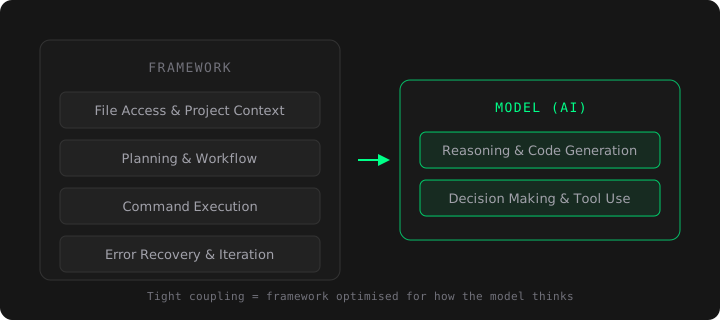
Every AI coding tool has two layers:
- The framework — the interface you interact with. It handles file access, project context, planning, command execution, and workflow.
- The model — the AI that reasons, writes code, and makes decisions.
Some tools lock these together. Others let you mix and match. The choice between these two architectures shapes everything.
| Approach | Example | Trade-off |
|---|---|---|
| Tightly coupled | Claude Code (Claude only) | Less choice, deeper optimisation |
| Loosely coupled | OpenCode (75+ models) | More choice, shallower integration |
| Middle ground | GitHub Copilot (GPT, Claude, Gemini) | Curated selection, official partnerships |
When the framework and model are built together, every interaction is optimised — the system prompts, the planning steps, the error recovery, the way context is gathered and fed back. The framework knows how the model thinks.
When they’re separate, the framework sends generic API calls and hopes for the best. It works. But there’s a ceiling.
Here’s a concrete example. Claude Code, before writing any code, enters a planning phase: it reads your project structure, traces import chains, examines existing test patterns, and maps dependencies. Only then does it start making changes. This workflow exists because the framework was designed around how Claude reasons — it knows Claude performs better with upfront context, so it gathers that context automatically.
A generic framework using the same model through an API won’t do this. It doesn’t know Claude’s preferences. It just sends the prompt.
The Frustration Test

This is my actual method for choosing tools. It’s simple, and it’s more reliable than any benchmark.
Use the tool on real work for a few hours. Pay attention to how you feel.
Not whether the output is “impressive.” Not whether it handles a contrived demo well. How you feel while working.
If you find yourself getting frustrated — the tool misunderstood your intent, went off in a wrong direction, produced something you’d never write, or required three follow-up prompts to correct — that’s the signal.
The tool can’t bridge the gap between your thinking and its output.
A good AI coding tool should feel like working with a capable colleague. You describe the goal. It figures out the approach. You review and adjust. The cycle should feel natural, not like wrestling.
This maps directly to the deTrouble principle: technology should reduce friction, not create it. If a tool adds cognitive overhead — if you’re spending more energy managing the tool than doing the work — it’s failed its basic purpose, regardless of what the benchmarks say.
The frustration test also reveals integration depth. Tightly integrated tools frustrate you less because the framework anticipates the model’s behaviour. Loosely coupled tools are more likely to surprise you — and not in a good way.
A Word on Benchmarks and Distillation
Speaking of benchmarks: be careful.
Some third-party models claim compatibility with tools like Claude Code by offering “Anthropic-compatible APIs.” Behind the scenes, many of these models were trained through distillation — feeding massive volumes of Claude’s outputs into their own training process to mimic its behaviour.
In February 2026, Anthropic disclosed that several providers had created over 24,000 fake accounts and generated more than 16 million conversations with Claude for exactly this purpose.
A distilled model might score well on standardised benchmarks. But benchmark performance and real-world reliability are different things. A model that has memorised patterns without understanding them will fail in novel situations — the exact situations where you need your tool most.
Benchmarks tell you what a model can do in controlled conditions. The frustration test tells you what it does in yours.
What I Use
Being transparent about my choices and their trade-offs:
Primary: Claude Code
The framework and model are built by the same team (Anthropic). The integration is the deepest available. It plans before it acts, verifies its own output, and connects to external tools through MCP.
It’s not perfect:
- Terminal-native — if you’ve never worked in a CLI, there’s a learning curve
- Cost — requires a subscription or API usage fees
- Regional availability — not accessible everywhere
- Claude-only — you’re committed to one model provider
But for me, the trade-off is clear. The output is consistently closer to what I intended, with less back-and-forth, than anything else I’ve tried.
Alternative: VS Code + GitHub Copilot (with Claude)
When Claude Code isn’t an option, this is the setup I’d recommend.
VS Code is the most widely used editor for good reason — 50,000+ extensions, monthly updates, stable, free. GitHub Copilot’s agent mode (since VS Code 1.97) handles multi-file editing, terminal execution, and autonomous planning. And because Microsoft and Anthropic have a formal partnership, Claude is available as an official model option in Copilot — the integration is maintained, not hacked together.
You can also run Claude Code’s VS Code extension alongside Copilot, giving you both workflows in one editor.
At $10/month for Copilot with Claude access, it’s practical and well-supported.
The Actual Point
Every few months, a new tool appears and the cycle restarts. New benchmarks. New demos. New hype. And people chase the latest thing without asking the question that actually matters:
Does this tool help me think, or does it make me think about the tool?
The best technology disappears into your workflow. You stop noticing it’s there. It just works — like breathing air.
That’s not a feature you’ll find on any comparison chart. But it’s the only one that matters.
Read next: Why Your Next Website Should Be AI-Native | You Need the Box Before You Can Think Outside It